KV
Querying Overview
Cloudflare KV is primarily a distributed key\value lookup service for custom applications. The Qarbine Administrator is responsible for setting various Data Service parameters such as the interaction tokens for looking up values. Data Source’s then reference the Cloudflare KV service for various interactions as described below.
Qarbine uses a JSON object as the KV query specification with the following primary fields.
| Field | Description |
|---|---|
| action | The type of interaction to perform. |
| namespace | The namespace in which to perform the action. This is generally the name of the namespace and not the underlying 32 character identifier. The latter may also be used as an argument for this field.The Qarbine administrator may have specified this value when configuring the data service. In this case the parameter is optional. |
The other fields vary by action as described below.
Note that for PNG, JPEG and other static images the Cloudflare Images service may suite your purposes. In a template simply use the image custom cell and provide the image URL as the formula.
Actions
Get the Namespace Cache
Qarbine caches the namespace name to identifier values so that the much more user-friendly names can be used as namespace parameters. The query specification for this is shown below.
 {
 action: 'getNamespaceCache'
 }
Sample results are shown below.

Get all of the Namespaces
The query specification for this is shown below.
 {
 action: 'getNamespaces'
 }
Sample results are shown below.

Get a Namespace’s Details
The query specification for this is shown below.
 {
 action: 'getNamespace',
 namespace: aNamespace,
 }
Sample results are shown below.

Get a Key’s Value
Below is a snapshot of some basic key\value pairs.
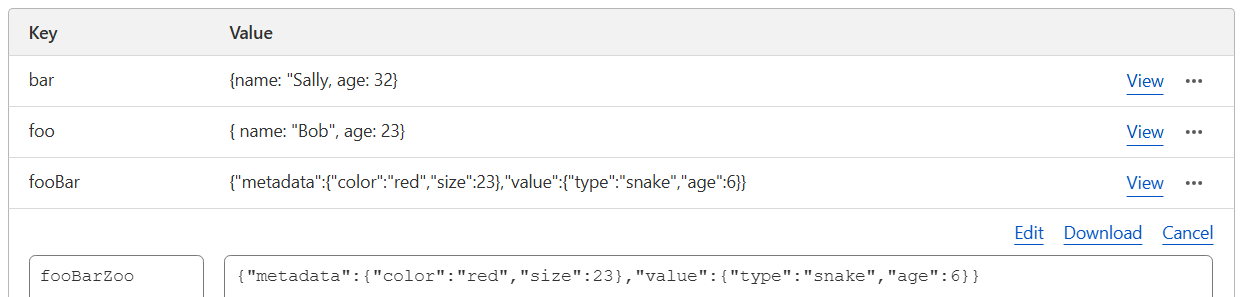
The query specification for this is shown below.
 {
 action: 'getKeyValue',
 namespace: aNamespace,
 key: aKey
 }
Below is the default result which is a text value when the key just has a value.

To convert that text into a JSON object add
convertJSON: true
The new result is

When the key has a value and meta data the result is an object with metadata and value fields.

The details of the row are shown below.

Get a Key’s Metadata
The query specification for this is shown below.
{
 action: 'getKeyMetadata',
 namespace: aNamespace,
 key: aKey
}
As of this authoring the KV response was always null. Use the getKeyValue action above instead if this remains to be the case.
Get the Keys in a Namespace
The query specification for this is shown below.
{
 action: 'getKeys',
 namespace: aNamespace,
 limit: atMostHowMany,
 prefix: aString,
}
Note that this could result in a large answer set. If possible use the prefix argument to have KV filter what is in the answer set. Exact matches and any key names that begin with the prefix will be returned.
Qarbine will return at most 10,000 keys. The limit value can also be used to reduce the total size of the answer set. For more details on this interaction see https://developers.cloudflare.com/api/resources/kv/subresources/namespaces/subresources/keys/methods/list/
Troubleshooting
The Cloudflare Dashboard provides a built-in KV Console where you can run queries interactively, inspect tables, and view results directly. Access it from the left sidebar using the option highlighted below.

For further information see https://developers.cloudflare.com/api/resources/kv.